City Navigator 3D Open World Driving
Reviews
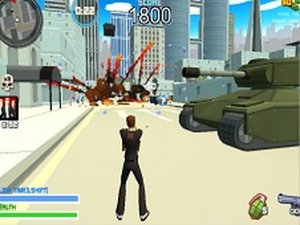
City Navigator 3D delivers a straightforward yet satisfying open-world experience. The city feels large enough to explore without being overwhelming, and the task system provides clear direction. Vehicle upgrades offer a welcome layer of strategy, letting players tailor their approach. The browser-based design ensures quick loading and no installation hassle. It is a solid choice for anyone seeking a casual driving game with structure.
Description
Urban Playground & Navigation
The game presents a fully realized 3D city with distinct districts, roads, and landmarks. Players can move freely on foot or behind the wheel, choosing how to traverse the environment. The layout encourages experimentation, as different routes may lead to new opportunities or shortcuts. This design supports both focused travel and casual wandering, making each session feel slightly different.
Assignment System & Progression
A series of tasks guide the player through the city, each with its own set of requirements. These may involve reaching specific destinations, delivering items, or interacting with objects. On-screen prompts clarify what needs to be done, and the game saves progress automatically. Completing assignments unlocks further content and potential upgrades, giving a sense of steady advancement.
Vehicle Variety & Upgrades
Several types of vehicles are available, ranging from compact cars to larger trucks. Each handles differently, affecting how quickly or easily players can move through traffic. Upgrades can improve speed, handling, or other attributes, making later tasks more manageable. Deciding which upgrades to prioritize adds a layer of strategy to the experience.
Controls & Accessibility
The game uses standard keyboard and mouse controls on desktop computers. Movement and driving rely on arrow keys or WASD, while aiming and interacting use the mouse. Full screen mode is supported for a more immersive view. Because it runs entirely in a browser, there is no need to download or install anything, which lowers the barrier to entry.
Visual Style & Performance
The 3D graphics depict a modern city with buildings, roads, and open spaces. The art style is clean and functional, focusing on clarity rather than realism. Performance is optimized for web browsers, ensuring smooth frame rates on most desktop systems. This balance allows the game to run well even on older hardware, broadening its accessibility.
Compatibility
Faq
Is City Navigator 3D free to play?
Can I play City Navigator 3D on a mobile device?
How do I save my progress in City Navigator 3D?
What types of vehicles can I drive in City Navigator 3D?
Are there any age restrictions for playing City Navigator 3D?
Does City Navigator 3D require a powerful computer?
Other Similar Games
Urban Precision 3D: Tactical Arcade

Street Race 3D Survival Arcade

Stellar Drift Arena

Majestic Hero Puzzle Journey

Wilderness Survival Adventure

Emergency Response Driving Simulator
City Bus Parking 3D Simulator

Garden Path Adventure Arcade

Cheerful Champion Baby Rescue

Feline Justice: Small Claims Stories

Sky Ball Arcade Runner